{"pageContext":{"article":{"title":"Windows & macOS: browser engine backends - Chromium vs WebKit","id":"standalone-browser-engines","description":"A comparison of the Chromium and WebKit browser engine backends used by 3D WebView for Windows and macOS.","createdDate":"2026-11-13","product":"Unity.WebView.Standalone","content":"[3D WebView for Windows and macOS](https://store.vuplex.com/webview/windows-mac) includes support for two different browser engine backends:\n\n- [Chromium](#chromium): The default browser engine for both Windows and macOS.\n- [WebKit](#webkit): Available for macOS only and powered by macOS's built-in [WKWebView](https://developer.apple.com/documentation/webkit/wkwebview?language=objc) component. Not utilized by default ([except for on Intel-based Macs](#apple-intel)) but can optionally be enabled for use instead of Chromium.\n\nThese two browser engine backends implement a common set of APIs (e.g. [IWebView](https://developer.vuplex.com/webview/IWebView)), so they can be used interchangeably unless an application utilizes engine-specific APIs. The pros and cons of each browser engine are discussed below.\n\nChromium browser engine (default for Windows and macOS)
\n\n3D WebView for Windows and macOS uses the [Chromium](https://en.wikipedia.org/wiki/Chromium_(web_browser)) browser engine by default on both Windows and macOS. The [IWebView](https://developer.vuplex.com/webview/IWebView) implementation for Chromium is [StandaloneWebView](https://developer.vuplex.com/webview/StandaloneWebView) (this detail only matters if an app uses StandaloneWebView's Chromium-specific APIs).\n\n### Pros:\n\n- Significantly better 3D rendering performance compared to WebKit.\n- Efficiently supports video playback.\n- Efficiently supports increasing the [pixel density](https://developer.vuplex.com/webview/CanvasWebViewPrefab#PixelDensity).\n- Provides a uniform experience on both Windows and macOS because the same browser engine is used for both.\n\n### Cons:\n\n- Doesn't support the Mac App Store. This is because Chromium is unable to run in the Mac App Store's sandboxed environment without significant modifications. For details on how to distribute a macOS app outside of the Mac App Store, see [this article](/articles/mac-app-store-and-notarization).\n- Storage footprint: the Chromium browser engine adds 250 - 360 MB to the app's size on disk. For details on how to minimize storage size, see [this article](/articles/how-to-reduce-size).\n- Doesn't support [Native 2D Mode](/articles/native-2d-mode).\n- On macOS, it supports Apple Silicon (arm64) only and doesn't support Intel-based Macs. See [this section below](#apple-intel) for details on how 3D WebView automatically uses the WebKit backend instead of Chromium when running on Intel-based Macs.\n\nWebKit browser engine (macOS only)
\n\nOn macOS, 3D WebView also provides the option to use macOS's built-in [WebKit](https://en.wikipedia.org/wiki/WebKit) browser engine. The [IWebView](https://developer.vuplex.com/webview/IWebView) implementation for WebKit is [MacWebKitWebView](https://developer.vuplex.com/webview/MacWebKitWebView), which internally uses macOS's built-in [WKWebView](https://developer.apple.com/documentation/webkit/wkwebview?language=objc) component (this detail only matters if an app uses MacWebKitWebView's WebKit-specific APIs).\n\n### Pros:\n\n- Supports the Mac App Store.\n- Supports [Native 2D Mode](/articles/native-2d-mode).\n- Small storage footprint: doesn't add significantly to the app's size because it uses the built-in WKWebView component instead of embedding a separate browser engine.\n- [Supports Intel-based Macs](#apple-intel) in addition to Apple Silicon.\n\n### Cons:\n\n- 3D rendering performance is significantly slower than Chromium, especially on Intel CPUs. The performance is also much more impacted by the webview size, [resolution](https://developer.vuplex.com/webview/CanvasWebViewPrefab#Resolution), and [pixel density](https://developer.vuplex.com/webview/CanvasWebViewPrefab#PixelDensity). This limitation can be avoided by using [Native 2D Mode](/articles/native-2d-mode).\n- Support for increasing the [pixel density](https://developer.vuplex.com/webview/CanvasWebViewPrefab#PixelDensity) in 3D rendering mode is disabled by default because it negatively impacts performance, but [can be enabled](https://developer.vuplex.com/webview/MacWebKitWebView#PixelDensityEnabled).\n- 3D rendering performance also degrades while playing video, so video playback is not recommended in 3D rendering mode. For video playback, it is recommended to either use [Native 2D Mode](/articles/native-2d-mode) or to use the Chromium backend instead.\n- Some web page may behave or render differently in WebKit vs Chromium because they are different browser engines.\n\nEnabling the macOS WebKit backend
\n\nIf you want to disable the Chromium backend on macOS so that your macOS build doesn't include Chromium, you can do so by going to \"Project Settings\" -> \"Vuplex WebView\" -> \"Windows and macOS\" and enabling the checkbox next to \"Disable macOS Chromium plugin and use WebKit\":\n\n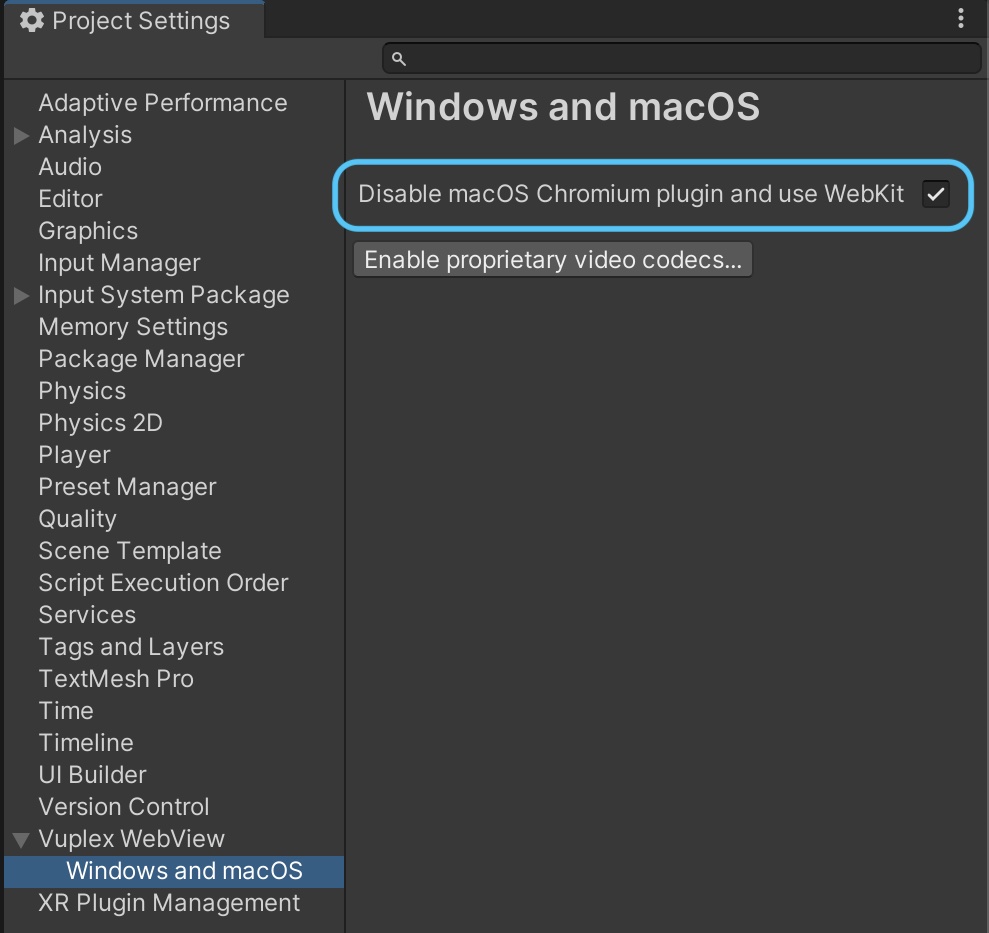\n\nOr if you have a use case where you want to use both Chromium and WebKit together at the same time (e.g. have a Chromium webview and a WebKit webview simultaneously in the same scene), you can leave the Chromium backend enabled and tell a WebViewPrefab to use WebKit by passing [WebPluginType.MacWebKit](https://developer.vuplex.com/webview/WebPluginType) to [SetOptionsForInitialization()](https://developer.vuplex.com/webview/CanvasWebViewPrefab#SetOptionsForInitialization), like this:\n\n```\nvoid Awake() {\n // Get a reference to your WebViewPrefab or CanvasWebViewPrefab before it's initialized:\n // https://support.vuplex.com/articles/how-to-reference-a-webview\n var webViewPrefab = GameObject.Find(\"CanvasWebViewPrefab\").GetComponent();\n\n // Tell the prefab to use WebKit instead of Chromium.\n webViewPrefab.SetOptionsForInitialization(new WebViewOptions {\n preferredPlugins = new WebPluginType[] { WebPluginType.MacWebKit }\n });\n}\n```\n\nSupport for Intel-based Macs
\n\nStarting with 3D WebView [v5.0](https://developer.vuplex.com/webview/releases), the Chromium browser backend for macOS supports only Apple Silicon (arm64) and doesn't support Intel-based Macs (x64). To support Intel-based Macs, when 3D WebView detects that it's running on an Intel-based Mac, it automatically switches to using the WebKit browser backend instead of Chromium. Since the default behavior is that Chromium is used for Apple Silicon and WebKit is used for Intel-based Macs, this means that web pages may perform and render differently on Apple Silicon Macs vs Intel-based Macs. Additionally, if an app is built to support Intel-based Macs but includes scripts that reference the [StandaloneWebView](https://developer.vuplex.com/webview/StandaloneWebView) class to utilize Chromium-specific APIs, it should handle the case where the webview implementation is [MacWebKitWebView](https://developer.vuplex.com/webview/MacWebKitWebView) instead of StandaloneWebView when running on Intel-based Macs.\n"}}}