
3D WebView for Windows and macOS includes support for two different browser engine backends:
- Chromium: The default browser engine for both Windows and macOS.
- WebKit: Available for macOS only and powered by macOS's built-in WKWebView component. Not utilized by default but can optionally be enabled for use instead of Chromium.
These two browser engine backends implement a common set of APIs (e.g. IWebView), so they can be used interchangeably unless an application utilizes engine-specific APIs. The pros and cons of each browser engine are discussed below.
Chromium browser engine (default for Windows and macOS)
3D WebView for Windows and macOS uses the Chromium browser engine by default on both Windows and macOS. The IWebView implementation for Chromium is StandaloneWebView (this detail only matters if an app uses StandaloneWebView's Chromium-specific APIs).
Pros:
- Provides significantly better 3D rendering performance than WebKit.
- Efficiently supports video playback.
- Efficiently supports increasing the pixel density.
- Provides a uniform experience on both Windows and macOS because the same browser engine is used for both.
Cons:
- Slow startup time on Apple Silicon (for now). 3D WebView currently uses an x64 build of Chromium, which runs on Apple Silicon via Rosetta. The first time that an app is run, there is an additional delay while Rosetta translates Chromium's machine code from x64 to arm64. In the future, I plan to update 3D WebView to use a native arm64 build of Chromium for Apple Silicon.
- Doesn't support the Mac App Store. This is because Chromium is unable to run in the Mac App Store's sandboxed environment without significant modifications.
- Storage footprint: the Chromium browser engine adds 250 - 360 MB to the app's size on disk.
- Doesn't support Native 2D Mode.
WebKit browser engine (macOS only)
On macOS, 3D WebView also provides the option to use macOS's built-in WebKit browser engine. The IWebView implementation for WebKit is MacWebKitWebView, which internally uses macOS's built-in WKWebView component (this detail only matters if an app uses MacWebKitWebView's WebKit-specific APIs).
Pros:
- Faster startup time on Apple Silicon.
- Supports the Mac App Store.
- Supports Native 2D Mode.
- Small storage footprint: doesn't add significantly to the app's size because it uses the built-in WKWebView component instead of embedding a separate browser engine.
Cons:
- 3D rendering performance is significantly slower than Chromium, especially on Intel CPUs. The performance is also much more impacted by the webview size, resolution, and pixel density. This limitation can be avoided by using Native 2D Mode.
- Support for increasing the pixel density in 3D rendering mode is disabled by default because it negatively impacts performance, but can be enabled.
- 3D rendering performance also degrades while playing video, so video playback is not recommended in 3D rendering mode. For video playback, it is recommended to either use Native 2D Mode or to use the Chromium backend instead.
- Some web page may behave or render differently in WebKit vs Chromium because they are different browser engines.
Enabling the macOS WebKit backend
If you want to disable the Chromium backend on macOS so that your macOS build doesn't include Chromium, you can do so by going to "Project Settings" -> "Vuplex WebView" -> "Windows and macOS" and enabling the checkbox next to "Disable macOS Chromium plugin and use WebKit":
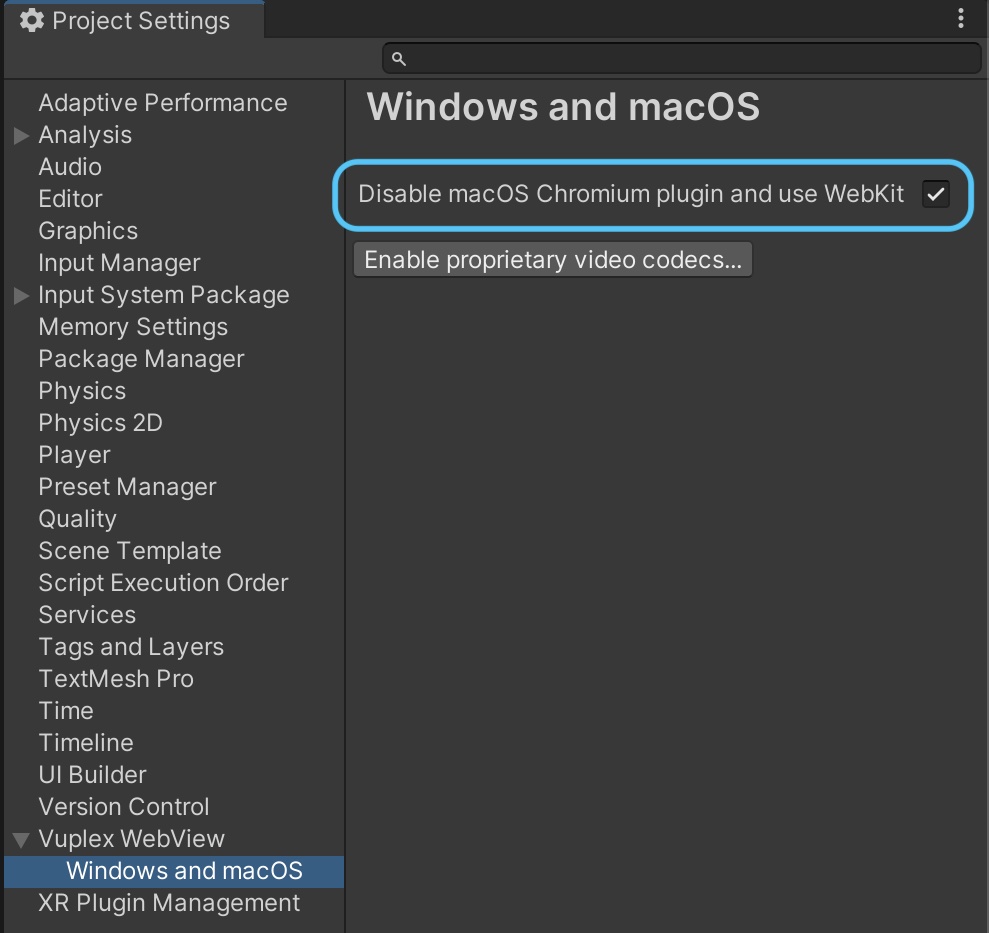
Or if you have a use case where you want to use both Chromium and WebKit together at the same time (e.g. have a Chromium webview and a WebKit webview simultaneously in the same scene), you can leave the Chromium backend enabled and tell a WebViewPrefab to use WebKit by passing WebPluginType.MacWebKit to SetOptionsForInitialization(), like this:
void Awake() {
    // Get a reference to your WebViewPrefab or CanvasWebViewPrefab before it's initialized:
    // https://support.vuplex.com/articles/how-to-reference-a-webview
    var webViewPrefab = GameObject.Find("CanvasWebViewPrefab").GetComponent<CanvasWebViewPrefab>();

    // Tell the prefab to use WebKit instead of Chromium.
    webViewPrefab.SetOptionsForInitialization(new WebViewOptions {
        preferredPlugins = new WebPluginType[] { WebPluginType.MacWebKit }
    });
}